
Example:
Data source: Heap table (a heap without a clustered index) Address_TEST, 9,963,912 rows, no nonclustered indexes.
Query:
SELECT *
FROM Person.Address_TEST
WHERE City = 'Prague'
ORDER BY PostalCode DESC;
Estimated Execution Plan 1:
Estimated Subtree Cost: 143.514 – high number = long runtime and heavy server load.
Execution plan:
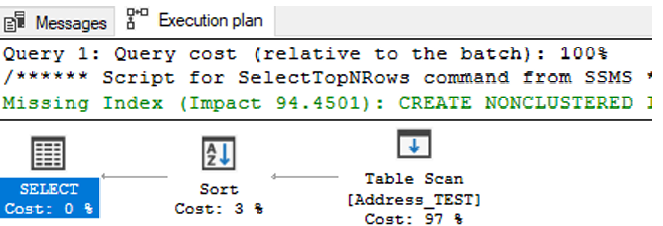
- Table Scan on Address_TEST – Cost: 97%
- Sort – Cost: 3%
- Total: 100%
SQL Server also suggests a Missing Index create (Impact 94.4501).
So based on the system’s index recommendation, I decided to create it:
CREATE NONCLUSTERED INDEX [IX_TEST1] ON [Person].[Address_TEST]
([City])
INCLUDE
([AddressID],[AddressLine1],[AddressLine2],[StateProvinceID],[PostalCode],[SpatialLocation],[rowgui
d],[ModifiedDate])
Estimated Execution Plan 2:
Estimated Subtree Cost: 0.0146486 – an acceptable number, but not perfect.
Execution plan:
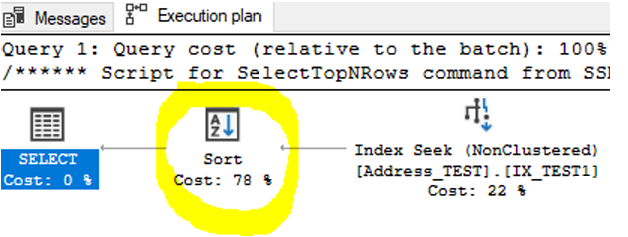
- Index Seek (NonClustered) on IX_TEST1 – Cost: 22%
- Sort – Cost: 78%
- Total: 100%
This is a much better result — the table scan changed to an index seek, which is what we want for a large table. However, there is still a heavy Sort operation (78%), so I will try to eliminate it with a new index:
CREATE NONCLUSTERED INDEX [IX_TEST2]
ON [Person].[Address_TEST] ([City],[PostalCode] desc)
INCLUDE ([AddressID],[AddressLine1],[AddressLine2],[StateProvinceID],[SpatialLocation],[rowguid],
[ModifiedDate])
Estimated Execution Plan 3:
Estimated Subtree Cost: 0.0032831 — now that’s fantastic, another order‑of‑magnitude improvement! Everything is handled inside a single index.
Execution plan:
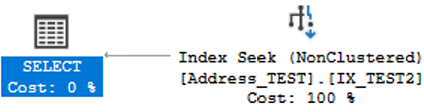
- Index Seek (NonClustered) on IX_TEST2 – Cost: 100%
- SELECT – Cost: 0%
Conclusion
Unfortunately, you cannot rely solely on SQL Server’s automatic index suggestions. You must focus on fine‑tuning the index.
Next time, we will show how to design the final optimal index manually, so you can completely ignore imperfect system-generated index recommendations — and save yourself time.